infra-shelf: a shared shelf of databases and queues for the homelab
Every new app I stand up in the homelab ends up asking for the same thing: a database, sometimes a queue, ideally provisioned before the first docker compose up. When I ran litellm, I needed Postgres. Infisical wanted Postgres and Redis. Other projects asked for RabbitMQ or MongoDB. The lazy pattern is to let each project bring its own Postgres + Redis in its own compose file — and then, three projects later, you’ve got three Postgres, two Redis, port conflicts everywhere, no real isolation, and backups scattered across folders nobody remembers.
I wrote infra-shelf to kill that pain, and it’s now open on GitHub: https://github.com/IvanMicai/infra-shelf.
The idea: a shared shelf
Instead of each app bringing its own database, I run one instance of each thing on a private Docker network (infra-shelf), and every app gets an isolated credential inside it. No handing the superuser to some random app.
The per-app separation happens inside each service:
| Service | Network address | Per-app isolation |
|---|---|---|
| PostgreSQL | postgres:5432 | dedicated database + user |
| Redis | redis:6379 | ACL user + key prefix |
| RabbitMQ | rabbitmq:5672 | dedicated vhost + user |
| MongoDB | mongodb:27017 | dedicated database + user |
| S3 (MinIO) | aistor:9000 | bucket + access key (opt-in) |
| SignOz | signoz-otel-collector:4317 | own service.name (opt-in) |
Postgres, Redis, RabbitMQ, and Mongo come up with a single make up. S3 and SignOz are optional overlays. Everything sits on the same network, so your apps connect by hostname (postgres, redis…) without exposing a port to the outside.
How I use it — the shelf CLI
The heart of it is a single Go binary, shelf. Provisioning an app is one line:
shelf setup myapp -s postgres,redis,rabbitmq,mongodbIt generates a random password per service, runs the admin commands inside the containers (psql, redis-cli, rabbitmqctl, mongosh), writes everything to a registry, and prints a ready-to-paste .env block:
# === PostgreSQL ===
DATABASE_URL=postgres://myapp:QzLiMENvUupGDz@postgres:5432/myapp
DB_HOST=postgres
DB_NAME=myapp

# === Redis ===
REDIS_URL=redis://myapp:keS6texnNfjnGr@redis:6379/0
REDIS_PREFIX=myapp:

# === RabbitMQ ===
AMQP_URL=amqp://myapp:j3XwLUjuRrEP11@rabbitmq:5672/myapp
RABBITMQ_VHOST=myapp

# === MongoDB ===
MONGODB_URL=mongodb://myapp:C0jbw2HqXVkuFs@mongodb:27017/myapp?authSource=myapp
MONGODB_DATABASE=myapp
From there the day-to-day is just a few more commands:
shelf credentials myapp          # reprint the .env when I lose it
shelf add myapp -s signoz        # plug an extra service into an existing app
shelf list                       # show every provisioned app
shelf status                     # health of the infra containers
There’s also a web UI (shelf-web), and the important detail is that it does not shell out to the CLI: both ends import the same Go library (internal/shelfcore) and call the same functions. CLI and web do exactly the same thing, with no stdout parsing in between.
The app-creation screen
When I’m not in the mood for the terminal, the web UI does the same provisioning through a form. The /apps screen has the app name field (pattern [a-z][a-z0-9-]*), an optional environments field (to expand into staging/production), checkboxes for the services, and a Provision button. Once provisioned, you can reveal the credentials and download the .env straight from the interface.
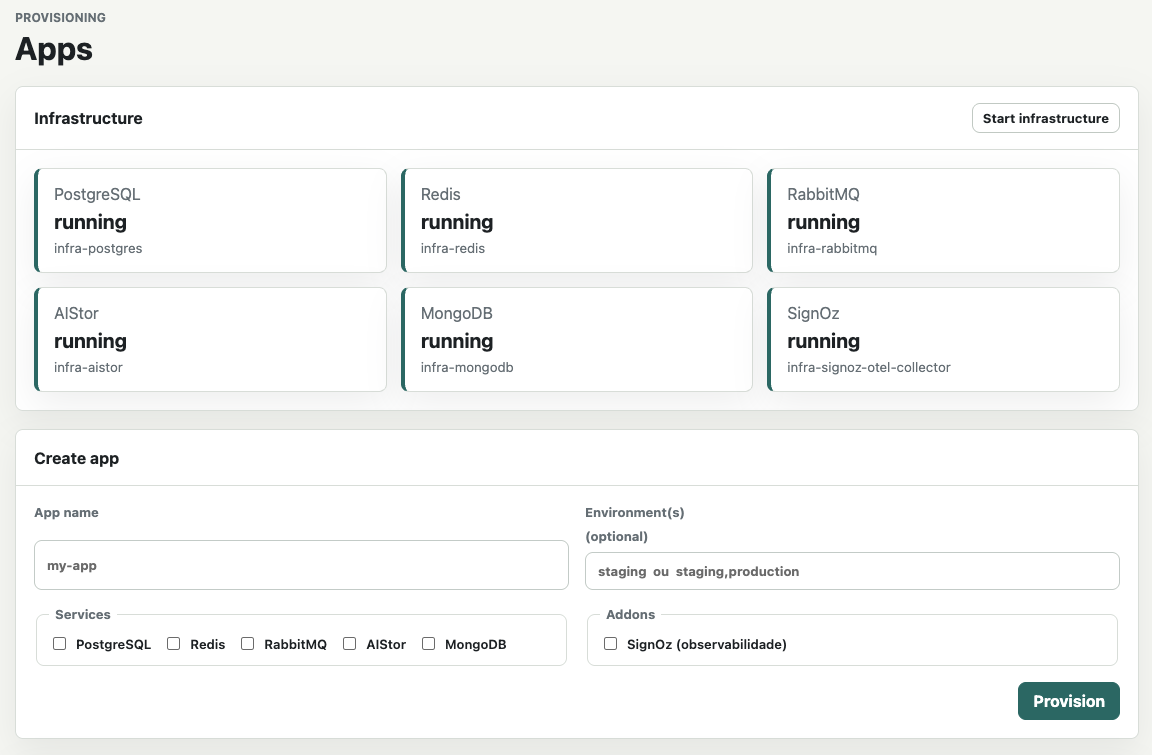
It runs at http://127.0.0.1:8080 behind Basic Auth, it’s server-rendered HTML (no frontend framework, pure-Go SQLite underneath), and it’s the way I most often spin up a new app on a weekend.
Backups — the safety net
Maybe the part that buys me the most peace of mind. Consolidating everything onto one shelf also consolidates the backup: it’s one strategy instead of six lost folders.
shelf backup myapp               # one app, all of its services
shelf backup --all               # every provisioned app
shelf restore myapp              # restore from the latest backup
Each service is saved the right way for it:
| Service | Method |
|---|---|
| PostgreSQL | pg_dump --clean --if-exists |
| Redis | snapshot of the app’s keys (<app>:*) |
| RabbitMQ | definitions export (vhost/users/policies) |
| MongoDB | mongodump of the app’s database |
And you can schedule it with retention, which is how I leave it running:
shelf schedule create myapp --cron "0 3 * * *" -z UTC --retention-days 14Daily backup at 3am, keeping 14 days. In case of disaster — a pool that corrupts, a volume that vanishes — I have somewhere to roll back to. The registry holding the secrets can also be encrypted at rest (AES-256-GCM, via INFRA_SHELF_SECRET), so the credentials file isn’t sitting in plaintext on disk.
”What about performance?”
The obvious question when consolidating is whether cramming everything into one instance makes things worse. In homelab practice, no — and the reason is a little silly: those six containers were already running on the same hardware, competing for the same CPU and I/O. Consolidating didn’t create new contention; it was already there. What changed was cutting the duplicated-process overhead — each Postgres instance carries its own shared buffers, background workers, and WAL processes, and that disappears once it’s a single instance with several databases.
| Container per project | Shared instance | |
|---|---|---|
| Number of DB containers | 1 per app (always grows) | 1 per service (fixed) |
| Memory (duplicated overhead) | high | low |
| Isolation | container | database/user + ACL |
| Backup | scattered | centralized |
| Port conflicts | common | none (internal network) |
There’s a concrete number for this: in one homelab Postgres consolidation, memory dropped from ~3.2 GB across six containers to ~1.8 GB on a single instance (DiyMediaServer). It matches what I saw here: fewer containers, same usage feel.
To be honest about the trade-off: consolidating makes sense for modest workloads, which is nearly every homelab. If some app has genuinely heavy writes, needs strict isolation, or wants a different database version, then a dedicated instance for it is worth it. For everything else, the shared shelf wins on simplicity by a mile.
How to stand it up
One-command install:
curl -fsSL https://raw.githubusercontent.com/IvanMicai/infra-shelf/main/scripts/install.sh | bashThe script checks prerequisites (git, docker, compose v2), clones the repo, creates the .env, builds the two binaries (using local Go if you have it, otherwise inside a container), and brings up the core stack. Then:
cd ./infra-shelf
# 1. change the default passwords in .env
# 2. shelf setup myapp -s postgres,redis,rabbitmq,mongodb
# 3. make app   →   http://127.0.0.1:8080
And for Claude Code users: the project ships a skill (infra-shelf-install) that automates the install and even wires your project into the infra-shelf network — it checks prerequisites, swaps the default passwords, provisions your first app, and adjusts your project’s compose to join the external network.
Wrap-up
It’s open on GitHub under MIT: https://github.com/IvanMicai/infra-shelf. If you also collect self-hosted projects in the homelab and you’re tired of standing up one Postgres per app, you can trade that mess for a single shelf in a weekend.
If this is your kind of thing, there’s more homelab around here — the anime upscaling pipeline and the 24 hours rescuing my TrueNAS. Ideas, issues, and PRs all welcome. 🦥